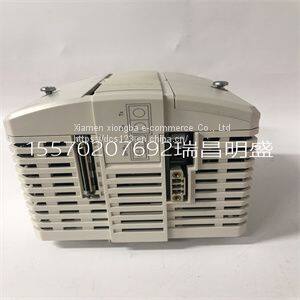
Module spare parts PM864A
Product Details
Product Details
Product Description
Product DescriptionFocus on DCS, PLC, robot control system and large servo system.
Main products: various modules / cards, controllers, touch screens, servo drivers.
Advantages: supply of imported original products, professional production parts,
Fast delivery, accurate delivery time,
The main brands include ABB Bailey, Ge / fuanc, Foxboro, Invensys Triconex, Bently, A-B Rockwell, Emerson, ovation, Motorola, xyvom, Honeywell, Rexroth, KUKA, Ni, Deif, Yokogawa, Woodward, Ryan, Schneider, Yaskawa, Moog, prosoft and other brands
The following connectivity options are available
Figure 1-1 FL MGUARD RS4000/FL MGUARD RS2000
FL MGUARD RS4000: (LAN/WAN) FL MGUARD RS2000: (LAN/WAN)
TX/TX Ethernet/Ethernet TX/TX VPN Ethernet/Ethernet + VPN
TX/TX VPN Ethernet/Ethernet + VPN
FL MGUARD
12 PHOENIX CONTACT 8334_en_02
FL MGUARD SMART2 The FL MGUARD SMART2 is the smallest device version. For example, it can be easily
inserted between the computer or local network (at the LAN port of the FL MGUARD) and
an available router (at the WAN port of the FL MGUARD), without having to make
configuration changes or perform driver installations on the existing system. It is designed
for instant use in the office or when traveling.
The FL MGUARD SMART2 is a further development of the FL MGUARD SMART.
Figure 1-2 FL MGUARD SMART2
FL MGUARD PCI4000 The FL MGUARD PCI4000 has the design of a PCI-compatible plug-in board.
The FL MGUARD PCI4000 is suitable for distributed protection of industrial and panel PCs,
individual machines, or industrial robots. It has a configuration memory in the form of a
replaceable SD card, which can be easily accessed on the front.
Figure 1-3 FL MGUARD PCI4000
FL MGUARD DELTA TX/TX The FL MGUARD DELTA TX/TX is ideal for use in desktop applications, in distribution
compartments, and other environments close to production process with low requirements
for industrial hardening.
Individual devices or network segments can be safely networked and comprehensively
protected. The FL MGUARD DELTA TX/TX can be used as a firewall between office and
production networks as well as a security router for small and medium-sized workgroups.
Figure 1-4 FL MGUARD DELTA TX/Green ON Power supply 1 is active
P2 Green ON Power supply 2 is active (FL MGUARD RS2000: not used)
STAT Green Flashing Heartbeat. The device is correctly connected and operating.
ERR Red Flashing System error. Restart the device.
– Press the Rescue button (for 1.5 seconds).
– Alternatively, briefly disconnect the device power supply and then connect it
again.
If the error is still present, start the recovery procedure (see Page 324) or contact your
dealer.
STAT+ ERR Flashing
alternately: green
and red
Boot process. When the device has just been connected to the power supply. After
a few seconds, this LED changes to the heartbeat state.
SIG – (Not used)
FAULT Red ON The alarm output is open due to an error (see “Installing the FL
MGUARD RS4000/RS2000” on page 20).
(The alarm output is interrupted during a restart.)
MOD Green ON Connection via modem established
INFO Green ON The configured VPN connection has been established.
Flashing The configured VPN connection is being established or aborted.
LAN Green ON The LAN/WAN LEDs are located in the LAN/WAN sockets (10/100 and duplex LED)
Ethernet status. Indicates the status of the LAN or WAN port. As soon as the device
is connected to the relevant network, a continuous light indicates that there is a
connection to the network partner in the LAN or WAN. When data packets are
transmitted, the LED goes out briefly
>> Loongyi 500kg Dry Food Spice Masala Flower Vegetable Peanut Powder V Blender Mixer Machine
>> Xe135b 13.8ton Official Famous Crawler Excavator
>> Hydac Sensor EDS3446-3-0250-Y00 EDS344-2-400-000 EDS344-2-600-000
>> Car rearview mirror mobile phone support car multi-function navigation mobile phone support seat
>> Znc Spark Erosion Machine Electrical Discharge Cheap Price Good Quality
>> canton fair recommend radiator copper separator machine aluminum and copper separator
>> MAICTOP car parts for fj cruiser steel roof rack
>> Ezd One-Stop Services Custom Ada Braille Door Signages for Hotel Room
>> Knife Sharpener Veneer Peeling Knife Grinder for Sale
>> 2016 Newest Electric Tricycle Three Wheelers Auto Rickshaw Tricycles
>> Machine Tool X6325A Universal Turret Vertical CNC Milling Machine
>> Perforated Metal Stainless Steel Mesh Speaker Grille Decorative Perforated Metal Mesh
>> CNC Channel Letter Bending Bender Machine for LED Signage Ads Industry Letter Bending Machine
>> Custom sublimation american football uniform cheap price full sublimation american football jersey
>> Good quality power window lifter switch for Corolla AE110 84820-12350
>> Foam Nozzle for Fire Extinguisher
>> Atc Multifunction CNC Router for Metal Cutting
>> Desktop Keyboard Computer Game Keyboard
>> Reliable China Honeycomb Machinery for Cardboard Production Solutions
>> High Quality Digital Semi-Auto Printing Machine P6 PCB Screen Printer Machine
>> Silver Crest Blender 2 in 1 Meat Food Processor
>> OEM 12588100 Timing Tensioner for Chevrolet Colorado 2.9L TN5002
>> PVC Window Making Machine CNC Roll Bending Machine Aluminium Window Machinery
>> Single Layer Belt Reusable Washable Belt Polyester Woven Belt Forming Fabric Mesh Belt for Belt Pulp Washer
>> Customized Color Sir/FKM/EPDM/NBR Pipe Gasket Connector Rubber Parts
>> 54000bph 500ml Pet Bottle Blow-Moulding Machine China
>> GAPV For Toyota Camry Vios Auto Rear View Mirror Cover Untinged 2006-2011 Accessories 87915-06905
>> MSL238 Women Muslim Turban Lady Adjustable Hijab Islamic Stretch Elastic Head Cover
>> OEM Factory 100L 200L300L DC/AC Solar PV Water Heater with Enamel Coating Tank
>> Riflescope Protective Cover Sight Bag Anti Scratch