请看看编码是否规范,使用是否方便
HTML:
代码
<table id="customTableView">
<thead>
<tr>
<td>编号</td>
<td>姓名</td>
</tr>
</thead>
<tbody><!--template-tbody-->
<tr name="" style=" display:none"><!--template-tr-->
<td bind="0"><span class="red">{value}</span></td>
<td bind="1"><strong>{value}</strong></td>
</tr>
</tbody>
</table>
<hr />
<table id="productTableView">
<thead>
<tr>
<td>编号</td>
<td>名称</td>
</tr>
</thead>
<tbody>
<tr style=" display:none">
<td bind="0"><span class="red">{value}</span></td>
<td bind="1"><strong>{value}</strong></td>
</tr>
</tbody>
</table>
Javascript:
代码
<script type="text/javascript">
//class TableView {
//构造函数
function TableView(ID){
var htmlTable = document.getElementById(ID);
this.container = htmlTable.getElementsByTagName("tbody")[0];
this.template = this.container.getElementsByTagName("tr")[0];
}
//成员方法
TableView.prototype.bind = function(dataSource) {
var template = this.template;
var container = this.container;
for(var k=0; k<dataSource.length; k++) {
var newRow = template.cloneNode(true);
newRow.removeAttribute("id");
newRow.removeAttribute("style");
for(var i=0;i<2;i++) {
var dataItem = newRow.cells[i];
dataItem.innerHTML = dataItem.innerHTML.replace("{value}", dataSource[k][dataItem.getAttribute("bind")]);
}
container.appendChild(newRow);
}
}
//}
//测试-1
var productDataSource = [["001","产品名称1"],["002","产品名称2"]];
var productTableView = new TableView("productTableView");
productTableView.bind(productDataSource);
//测试-2
var customDataSource = [["001","客户姓名1"],["002","客户姓名2"]];
var customTableView = new TableView("customTableView");
customTableView.bind(customDataSource);
</script>
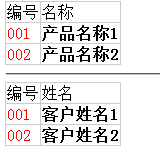
输出结果为: