web前端开发的时候经常会遇到要做表单的页面或者做一些表格的效果如相同内容要同一个单元格里面显示,一般的方法是table里面在套table但是这种方法会增加页面的负担影响页面加载速度但是如果用DIV有不好控制写的css样式要很多,那怎么办呢?我们就中和下利用JQuery来和他一个table里面相同内容的单元格,这里代码跟大家分享下,希望对大家有用,如下:
头部JQuery代码
<script type="text/javascript">
jQuery.fn.rowspan = function(colIdx) { //封装的一个JQuery小插件
return this.each(function(){
var that;
$('tr', this).each(function(row) {
$('td:eq('+colIdx+')', this).filter(':visible').each(function(col) {
if (that!=null && $(this).html() == $(that).html()) {
rowspan = $(that).attr("rowSpan");
if (rowspan == undefined) {
$(that).attr("rowSpan",1);
rowspan = $(that).attr("rowSpan"); }
rowspan = Number(rowspan)+1;
$(that).attr("rowSpan",rowspan);
$(this).hide();
} else {
that = this;
}
});
});
});
}
$(function() {
$(“#table1″).rowspan(0);//传入的参数是对应的列数从0开始,哪一列有相同的内容就输入对应的列数值
$(“#table1″).rowspan(2);
});
</script>
在body里面加入一个表格
<body>
<table id="table1" border="1" cellpadding="5" cellspacing="0" width="300px">
<tr>
<td>1</td>
<td>2</td>
<td>3</td>
<td>4</td>
</tr>
<tr>
<td>1</td>
<td>f</td>
<td>3</td>
<td>s</td>
</tr>
</table>
</body>
IE效果

火狐效果
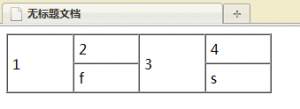
更多的前端开发可以关注 UI前端